
by Tyrell | Feb 3, 2025 | Blog
Tyrell empowers media professionals with cutting-edge solutions like cunoFS. In this blog, MD Bryan Malone explains how cunoFS revolutionises collaborative editing by bridging the gap between on-premise speed and cloud efficiency. Solving many of the challenges creative teams face.

What is cunoFS?
BM: cunoFS is the latest advancement in enabling fast and secure collaboration for editorial teams worldwide. It allows your preferred NLE (Non-Linear Editor), such as Adobe Premiere Pro or DaVinci Resolve, to access the largest, most cost-effective shared storage pool on the planet while providing on premise level performance.
Why should media professionals use cunoFS?
BM: cunoFS liberates the creative process from the traditional limitations of local hardware, networks, storage capacity, and network complexities. cunoFS enables productions to collaborate seamlessly without needing to move, manage, or download content. You pay only for the storage you use, not for potential capacity. Enabling users to work together from anywhere, on any type of computer.
How does cunoFS work?
BM: Cloud storage offers significant cost savings over traditional on premise storage. cunoFS allows macOS, Windows, and Linux workstations to seamlessly access cloud storage with local drive performance. Users simply log into the cunoFS client, mount the storage, open their NLE, and begin working. Files uploaded through cunoFS are immediately available to all users—no hassle, no complications. As well as being OS agnostic, cunoFS is as happy on a physical on premise workstation as it is running on a virtualised cloud computing platform like Tyrell Cloud, allowing both to utilise the same storage without complicated file sharing or network orchestration.
How is cunoFS different?
BM: cunoFS interfaces very tightly with the operating system, resulting in highly optimised storage performance. Unlike other similar applications, cunoFS leaves the asset complete, exactly as created by the NLE. This allows other technologies, such as SaaS platforms or archives, to also use the asset without any compatibility issues. This “no scrambling” design was a core principle of cunoFS, ensuring uncomplicated and unconditional access to your data.
cunoFS uses intelligent fetching and pre-fetching mechanisms to minimise egress costs, latency, and API calls. It doesn’t require downloading an entire asset; when a cursor is placed on the timeline, it requests only the necessary video frames. This makes editing much more responsive and keeps egress costs under control.
Originally developed for the life sciences sector, where data security is paramount, cunoFS adds POSIX Access Control metadata to assets, enabling granular object-level access control and enhancing enterprise security. It also utilises cloud storage IAM (Identity Access Management) control, deployable on a user-by-user basis, with user access based on cloud security keys. SSO and specific folder permissions are planned for Q2 2025-so watch this space!
How does cunoFS work with different cloud storage providers, and what makes Storj a particularly good choice?
BM: The cunoFS client is compatible with any public or private object storage provider, and it can even access storage on multiple vendors simultaneously, providing you with maximum workflow and commercial flexibility.
When paired with Storj, the powerful technology of cunoFS becomes an incredible workflow opportunity. Storj is 90% cheaper than the largest cloud providers, greener than any provider, and, most importantly, regionless—a file stored on Storj is instantly available worldwide. A user uploading a file in LA using cunoFS and Storj makes it immediately available for editing by a user in London. Cheaper, faster—a powerful combination!
Storj has turned the world of cloud storage on its head. Find out more by reading our recent Storj blog or attend our upcoming cunoFS and Storj webinar. Click here to find out more and register.
Bryan Malone
Want to find out more?
Contact us sales@tyrellcct.com or call 0207 148 6201 or +353 (1) 888 1118</b
by Tyrell | Jan 22, 2025 | Blog
Learn how decentralised storage can revolutionise your media workflows. In this Q&A, Dan Muchmore, Sales & Marketing Director at Tyrell, shares his insights on the benefits of Storj, a game-changing decentralised storage platform.
Q: What initially drew Tyrell to Storj as a potential technology partner?
Dan: At Tyrell, we're always on the lookout for innovative solutions that truly benefit our customers, particularly in the cloud. I have to say, when the Storj team shared their vision with us, it was incredibly exciting. They offer something truly special: a powerful trifecta of significant cost savings, advanced technology, and a strong focus on sustainability. It's a combination you simply won't find anywhere else.
Q: Can you offer more detail into the commercial benefits Storj offer?
Dan: Storj delivers a jaw-dropping cost advantage, slashing costs by up to 90% compared to traditional cloud object storage like AWS S3. By leveraging the underutilised capacity of tens of thousands of object storage nodes worldwide through a beneficial commercial scheme, Storj provides major savings for both short-term cloud workflows, directly impacting a production's bottom line, and offering huge long-term savings for archives.
Q: One of Storj's key differentiators is its lack of regional lock-in. How does this benefit users in terms of data accessibility, redundancy, and the ability to collaborate remotely?
Dan: With traditional cloud providers, you're often tied to specific data centres or Availability Zones. This can become a real headache—not only can it be expensive, but it also means juggling complex management across different locations. Storj takes a different approach. It splits your data into secure, independent segments and spreads them across a vast global network of storage nodes. This distributed design gives you some fantastic advantages.
One key benefit is accessibility: when you need your data, Storj finds the closest access point on the network, ensuring fast and consistent retrieval no matter where you are. With over 20,000 storage locations, compared to the 100+ data centres of traditional providers, this makes a huge difference. Furthermore, redundancy is built in, giving you peace of mind. No extra engineering or complicated setups are needed, and because only a small portion of the data segments is required to rebuild your files, data loss becomes incredibly unlikely.
Storj also truly simplifies remote collaboration. Need to collaborate with someone across the globe? No problem. A file uploaded in LA, for example, can be edited in real-time by someone in London, significantly cutting costs and streamlining your workflow.
Q: What are the green benefits of Storj and how do they benefit customers?
Dan: Whether you're a large corporation or a small TV production company, we all know that reducing our carbon footprint and embracing sustainability is a big priority these days. One of the biggest environmental impacts of data storage, including the distributed cloud, comes from manufacturing the storage hardware itself. Storj tackles this problem in a smart way:
No Extra Energy Use: Since Storj uses existing storage drives that are already running, it doesn't add any extra energy consumption.
No Added Cooling Emissions: Because the drives are already in operation, Storj doesn't create any additional cooling emissions.
Less Demand for New Hardware: This means fewer resources need to be mined to create new drives, servers, and data centres. The storage capacity is already there—we simply put it to good use.
By using Storj in your post production or archive workflow, you can immediately boost your sustainability efforts and contribute to your albert certification. In fact, you can reduce your carbon intensity by a significant 83% compared to using on-premise storage or other cloud providers.
Q: How can customers get started with Storj?
Dan: The Tyrell team is happy to discuss your specific needs and workflows. Contact us sales@tyrellcct.com or call 0207 148 6201 or +353 (1) 888 1118. Alternatively, you can sign up directly at https://www.storj.io/signup?partner=tyrell
 Dan Muchmore
by Tyrell | Dec 4, 2024 | Blog
In today’s fast-paced media landscape, productions need to be agile, efficient, and cost-effective. Traditional infrastructure models can often fall short, presenting challenges when scaling resources, managing costs, and ensuring business continuity.
Tyrell, in partnership with ERA, offers enterprise-grade hosted storage solutions, including Avid NEXIS or EditShare EFS, to address these challenges, with flexible plans starting from just £541/€656 per month. These solutions empower media organizations to focus on creativity while we handle the technical complexities.
Your OpEx alternative to traditional post production infrastructure
In today’s demanding post production landscape, staying ahead of the curve requires agility and financial efficiency. Choosing a long-term technical strategy and supporting a changing workforce in an uncertain commercial climate is especially challenging.
Tyrell, a leader in media technology solutions, and ERA, a provider of enterprise-grade hosted infrastructure, have joined forces to offer a powerful answer to your needs.
AVID NEXIS or EditShare EFS – Monthly, Annually Your Choice
- Powered by ERA infrastructure: Leverage a robust, hosted enterprise grade network and editorial infrastructure managed by ERA’s experts.
- Flexible storage options: Choose from industry-leading storage solutions- EditShare EFS or Avid NEXIS, seamlessly integrated by Tyrell.
- Scalable workstations: Easily scale your workstation capacity up or down as required by your production cycles, all expertly managed by Tyrell.
- Remote collaboration with HP Anywhere: Empower your team to collaborate and access projects from anywhere with HP Anywhere solutions, expertly maintained by Tyrell.
- Business continuity for peace of mind: Protect your valuable work with optional business continuity solutions designed by Tyrell, ensuring continuity for both ongoing and temporary productions.
Your hassle-free solution for temporary projects
Traditional temporary hire models waste time and resources. Manhandling equipment, network integration, and decommissioning can be cumbersome and inefficient. Staying ahead of the curve requires agility and financial efficiency.
Tyrell, a leader in media technology solutions, and ERA, a provider of enterprise-grade hosted infrastructure, have joined forces to offer a powerful answer to your needs.
AVID NEXIS or EditShare EFS – Monthly, Annually Your Choice
- Hire without headaches: Quick turnaround times and instant availability ensure you can focus on projects, not logistics.
- No kit on site: Eliminate the need for on-site hardware setup and infrastructure requirements.
- Remote access: Work seamlessly from anywhere with instant remote access to your editing environment.
- Remote collaboration with HP Anywhere: Empower your team to collaborate and access projects from anywhere with HP Anywhere solutions, expertly maintained by Tyrell.
- Scalable workstations: Easily scale your workstation capacity up or down as required by your production cycles, all expertly managed by Tyrell
- Cost-effective: Tyrell’s cloud-based solutions make temporary hiring smarter and more affordable.
Disaster Recovery without breaking the bank
Having a robust disaster recovery (DR) solution is not a nice to have, it’s critical. You need to ensure that an incident doesn’t grind your business to a halt. But building a dedicated DR site can be expensive and impractical. That’s where we come in.
Tyrell, a leader in media technology solutions, and ERA, a provider of enterprise-grade hosted infrastructure, have joined forces to offer a powerful answer to your needs.

AVID NEXIS or EditShare EFS – Monthly, Annually Your Choice
- OpEx alternative: Pay for what you use, eliminating large capital expenditures for DR infrastructure.
- Flexible storage options: Choose from industry-leading storage solutions- Avid NEXIS or EditShare EFS, seamlessly integrated by Tyrell.
- Full/partial replication: Replicate all or a portion of your content to the same reliable infrastructure you use daily.
- Remote editing: Support remote editing teams in case of facility access issues.
- Reduced footprint: No need for additional physical space for DR infrastructure.
Invest in peace of mind with prices starting from an incredibly affordable £541/€656 per month.
T&C’s apply, contact the Tyrell team to find out more.
Email sales@tyrellcct.com or call 0207 148 6201 or +353 (1) 888 1118.

by Tyrell | Oct 24, 2024 | Blog
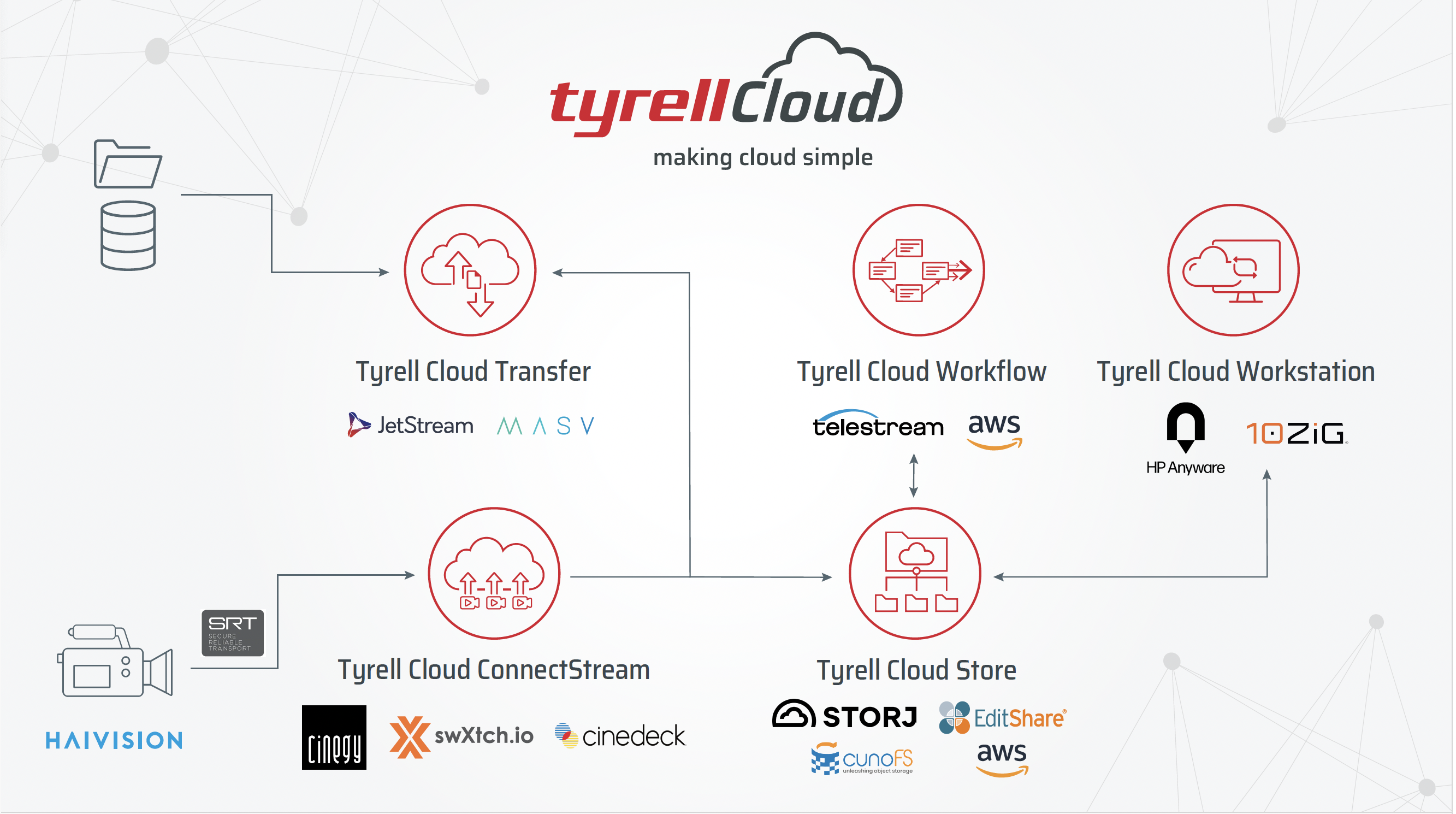
We recently launched Tyrell Cloud ConnectStream, our cutting-edge IP video contribution ingest service. This new service enhances the Tyrell Cloud platform, providing users with the ability to ingest multiple video ingest streams directly into Tyrell Cloud.
By leveraging the widely adopted SRT protocol, ConnectStream delivers seamless, high-quality IP streams tailored to meet the growing demand for sending broadcast-grade video over the public internet.
To delve deeper into this exciting new release, we sat down with Nick Soper, Tyrell Cloud Platform Owner…
Q: What types of video productions can benefit from ConnectStream?
Nick: ConnectStream is perfect for any live production that involves ingesting video feeds via SRT. For example, ingesting from multiple cameras for fly on the wall documentaries, live music events, or sports broadcasts.
Q: ConnectStream emphasises “zero engineering” – what does that mean for users?
Nick: ConnectStream’s zero-engineering approach simplifies the video ingest process, making it an incredibly user-friendly experience.
To get started, users simply launch the required number of ingest channels within the Tyrell Cloud Control interface. Next, they configure their SRT encoders to send the video stream to the specified inbound IP addresses provided by ConnectStream. Once the SRT stream is successfully being streamed into Tyrell Cloud, users can point their chosen application to the outbound IP address to receive the stream. It’s really that simple!
Q: Traditional cloud video ingest can be cumbersome. Why?
Nick: Traditional cloud video ingest methods often involve deploying Windows-based capture applications on virtual machines or instances with public-facing IP addresses. However, this approach can pose significant security risks, as these exposed instances can become vulnerable to hacking attempts.
Tyrell Cloud addresses this challenge by providing a simple user interface to manage the streams and has engineered its Workstation service to deploy windows workstations within private subnets.
Tyrell Cloud Workstations cannot be accessed directly from the internet, significantly reducing the risk of unauthorised access and ensuring the security of your video content.
ConnectStream removes the need for users to be cloud literate or understand cloud networking. Our user interface automates the process, providing a simple, OpEx, user friendly workflow. Deploy when required, pay only for the time used.
Q: How does ConnectStream address this challenge?
Nick: Think of ConnectStream as a secure tunnel that delivers your video stream directly to your application within the security of the private network. It eliminates the need for complex configuration and ensures your valuable video content remains protected.
Q: What are the benefits of using ConnectStream with swXtch.io?
Nick: swXtch.io is another fantastic tool that simplifies how you distribute your video stream within your cloud environment. By combining ConnectStream and swXtch.io, you greatly expand your live production workflow in the cloud.
ConnectStream streamlines the process of getting your high-quality video stream into the cloud VPC using SRT, while swXtch.io optimises distribution within the cloud using multicast technology to efficiently distribute that stream to your applications. This powerful combination eliminates the need for complex configurations, reduces bandwidth usage, and ensures the integrity of your original video stream, ultimately enhancing the efficiency and reliability of your live production.
Want to find out more about ConnectStream and swXtch.io?
We’re hosting a joint webinar with the swXtch.io team on Tuesday, November 19th.
Click here to Register
Watch our latest video as Dan Muchmore and Nick Soper demonstrate the power of Tyrell Cloud ConnectStream.

Nick Soper
Contact Nick and the Tyrell team on:
sales@tyrellcct.com or call 0207 148 6201 or +353 (1) 888 1118.

by Tyrell | Feb 9, 2024 | Blog, Cloud, News
We are delighted that our partner MASV has featured Tyrell Cloud in their guide to the Top virtual workstations for media and entertainment. The guide says:
Tyrell Cloud allows broadcasters and video producers to migrate production workflows to the cloud without any technical experience.
Users of Tyrell’s cloud-based editorial workflow tools can quickly ingest encrypted content from various sources – including streaming content directly from a camera – while easily deploying new virtual workstations on demand and reducing post-production turnaround time. Users can spin up, pause, or delete workstations for editing, VFX, or streaming with a couple of clicks and start working on them in minutes.
Video editors can then use Tyrell’s EditShare functionality to begin collaborating on ingested video content practically instantly through shared storage, asset management tools, and a highly performant environment.
Tyrell’s Cloud Workflow provides users with automated media file processing, object detection, transcription, and translation of media through AI and machine learning (ML) tools in the cloud. And because all raw files remain in the cloud indefinitely with proxy formats provided for editing, Tyrell’s egress costs are typically very low.
Click here to read the full guide.
Contact the Tyrell Team to find out how Tyrell Cloud can revolutionise your production and post workflows sales@tyrellcct.com.

by Tyrell | Nov 7, 2023 | Blog, Cloud, News
Written in partnership with Jim Donnelly, MASV.
The global live sports rights market is set to exceed $60 billion by 2024, prompting broadcasters to enhance their offerings with on-demand and live-streaming services.
To keep up with the escalating demand for live content, broadcasters need to be more adaptable, efficient, and agile. Rather than investing heavily in scaling existing on-premises workflows, migrating to the cloud offers a cost-effective and flexible solution.
In collaboration with Tyrell, this guide delves into the essentials of how to move your broadcast workflow to the cloud. It covers the migration process, the advantages of a cloud-based approach, and key best practices to avoid common pitfalls.
The State of Cloud-Based TV Broadcasting
Most broadcasters have plans to dip their toes into the cloud pool (if they haven’t already). As mentioned up top, the market is expected to grow to $60 billion in 2024. A recent Nevion survey of senior technology decision-makers in the broadcasting industry shows that while cloud adoption is a priority for only one-third of organizations, nearly 90% still intend to adopt cloud workflows within the year.
Tellingly, nearly half indicated it would be their first foray into the cloud, with more than 80% indicating that the pandemic convinced them of the need for more cloud production tools.
The report also says broadcasters use cloud technologies the most often on:
- Post-production and file-based production tasks (63%)
- Playout and distribution (58%)
- Recording and playback (45%)
At the same time, however, the survey also illustrated reservations among broadcasters regarding the cloud’s suitability, including concerns about latency (45%) and security (40%). A further 39% indicated that internal resistance to change was another barrier to large-scale adoption.
Still, there’s no arguing that cloud-based workflows have made serious inroads in the industry, with use cases as varied as live sports and events to over-the-top (OTT) platforms for streaming recorded content.
The Benefits of Cloud-Based Broadcast Workflows
Cloud workflows offer several benefits for broadcasters. Here are some of the most significant:
Cost Savings
Cost savings are one of the most obvious benefits of moving workflows to the cloud. Traditional broadcasting is expensive:
One analyst estimated in 2018 that the NFL Network shells out around $1 million in production costs for each televised game using traditional broadcast methods.

Source: TV News Check
Add to that the fact that margins on live sports broadcasts are eroding – with broadcasters paying an average of 9% more each year for NBA rights, and 5% each year to show NFL games, for example – and the need to cut costs becomes imperative.
Usage-based cloud services can help broadcasters optimize costs by replacing expensive CAPEX (such as on-premises data storage) with smaller and more manageable OPEX costs. That way, you can move your media workflow to the cloud and only pay for what you need. Organizations can also use cloud tools to monitor ongoing costs and set cost thresholds in real-time.
Such a cost structure can be a huge bonus for broadcasters who have traditionally invested in expensive technology purchases, according to Nick Soper, Cloud Product Manager at media cloud consultancy Tyrell, in an interview with MASV.
“Outside of license fees, you’re not paying for the technology when you don’t use it,” he says. “You turn it off and save money when you need to.”
Additionally, traditional workflows for digital distribution are no longer needed in the cloud. Broadcasters can transcode, encode, and perform other traditional production and distribution workflows in the cloud instead of relying on programmers, local station groups, or distributors.
Other cost-related elements to keep in mind:
- Cloud services can get expensive quickly if you’re not careful — especially if organizations don’t have the right cloud expertise or forget to turn off instances when they’re not required.
“(Broadcasters new to cloud) will often experiment and try things themselves initially, but they usually get burned by cost,” Soper says, “after leaving an EC2 instance on over the weekend, for example.”
- Finding (and paying) cloud engineers who know what they’re doing can be a big challenge for broadcasters.
- A hybrid cloud/on-prem approach can also get expensive and needlessly complicated since it requires the maintenance of two completely different systems, which is why developing cloud-native workflows is typically more efficient and less costly than replicating on-prem workflows in the cloud.
Flexibility
Aside from cost, the biggest advantage to broadcasters – and organizations in most industries – is flexibility:
- Cloud infrastructure allows organizations to scale up and down quickly, as needed, without purchasing emergency hardware or over-provisioning to handle occasional busy periods.
- Organizations can future-proof their business by adding new technologies offered by their cloud provider, such as machine learning modules. A customized multi-vendor approach allows broadcasters to swap out technologies or components as needed, and not become locked into a single vendor.
- Or they can experiment with new business models enabled by the cloud, such as subscription-based streaming services.
- Cloud also offers production flexibility through remote workflows no matter where a live event or the organization’s staff are located, or how and to whom the content will be distributed.
- Cloud storage also offers greater flexibility when delivering content to several different endpoints simultaneously and for enhancing the value and richness of content with AI-powered metadata.
Soper says broadcasters can enjoy this kind of flexibility without compromising on quality. “You can get the same creative content from the cloud that you would do on-prem,” he says. “You can build a deployment pipeline with a vision mixer with two mix effects buses, a character generator, or other processes. The vendors are available to deliver those products.”
On-prem setups, on the other hand, are far less scalable or flexible.
“When you go on prem, you’re making the largest of foundational footsteps in infrastructure – you’re saying ‘I will have this architecture for the next three, five, or 10 years,’” explains Tyrell Sales Director Dan Muchmore.
“But the problem with that is that if there are any changes to market requirements, you have to pivot around your technical choice. If there’s any change to your customer base or your business, you have to pivot around that technical choice,” he adds. “And those lumpy decisions become big, big burdens within the business.”
Efficiency and Speed
The flexibility mentioned above facilitates greater efficiencies by simplifying logistics, travel, and other issues that add complexity to live and other events. This speed helps broadcasters better capitalize on fast-moving live events, such as creating highlight packages during an ongoing broadcast.
Cloud workflows can also be configured to reside in the cloud, replicated, and set to not activate unless certain conditions are met via automation tools — a potentially significant efficiency gain over traditional workflows.
For live broadcasts, Soper says organizations can create replicable deployment pipelines that can be switched on with the push of a button just before the next live event.
Cloud platforms also offer sophisticated analytics tools to help broadcasters better understand their audience and tailor content to specific viewer groups.
Reliability
Reliability is arguably the most critical aspect of broadcasting: Disappointing viewers with broken feeds or other production issues can lead to a lack of trust.
Cloud provider service-level agreements (SLAs) generally offer minimal downtimeand faster time to recovery in case of an outage — whether caused by malware, ransomware, extreme weather, or other factors — through replication, backups, and other means.
Partnering with a cloud provider also means it’ll be their employees spending the most time on disaster recovery (DR), not your own.
Security
It’s widely acknowledged that unless you’ve got the money and time to build the Fort Knox of data centers, the cloud is a safer and more secure (when configured correctly) place to keep your data — especially when you use a well-known public cloud such as AWS or Google Cloud.
Cloud providers automatically update and patch their systems faster and more efficiently than any in-house team, while offering 24-7 protection via secure data centers, network segmentation, and automated protection against attempted incursions by bad actors.
Understanding Cloud-Based Broadcasting
These advantages signify the importance of cloud-based workflows for TV production going forward, with experts predicting that live and near-live sports, e-sports, entertainment, and enterprise applications will lead cloud adoption.
But what does cloud-based broadcasting look like right now?

Source: Seneca College
Cloud workflows are suitable for nearly every aspect of live production. This includes video editing, graphics and VFX, communications, and talkback. Live broadcasts via the cloud can accommodate dozens of cameras with all feeds ingested and switched in the cloud, reach more people through over-the-top (OTT) TV services, and support expanded functionality such as generating sports data feeds in close to real-time.
The latter is especially important for broadcasters trying to reach and engage new and younger audiences, explains Tyrell’s Muchmore.
“My kids watch live sport in a different way than I do – they’ve always got a device in their hand. Broadcasters need to engage with them on that device – but that tech is not a part of the traditional broadcasting infrastructure.”
Some of the main areas in which broadcasters have begun to implement cloud technologies include:
- Transcoding: Programmers and distributors increasingly use cloud-based software to convert file formats via transcoding, instead of more traditional hardware transcoders.
- Encoding: In the same vein, cloud-based encoding can convert broadcast signals into digital formats, instead of hardware encoders. Google points out that this workflow can particularly benefit broadcasters with several local station groups, since they can send signals to one cloud location instead of each group needing its own encoder.
- Automation: Advertisement signaling, dynamic ad insertion, messaging around breaks, and other workloads are often automated in the cloud.
- Storage and archive: Cloud platforms offer infinitely scalable storage, although cost can be an issue as more data is stored and archived. This is a fairly obvious one given cloud’s inroads in the data storage industry across virtually all industries.
- Stream packaging: The cloud can help prepare broadcast content for multi-screen delivery more efficiently, since the content lives closer to content delivery networks, which can reduce latency.
- Signal distribution: Broadcasters can send their signal to the cloud – where it’s encoded, packaged to partner specifications, and redistributed – instead of having to deliver directly to each TV distributor.
Amazon divides the cloud broadcast distribution chain into four main pieces:
- Storage: Content stored in the cloud is instantly available for playout or transport. Broadcasters can use faster storage for content required in the short term and cold or archive storage (which is less expensive) for less frequently accessed video.
- Transport: Depending on the distribution method, data and files must be transported to various partners and endpoints quickly and reliably.
- Linear playout: The ordering of various files in the correct sequence to facilitate a linear channel. These files can include the TV program itself, advertisements, and internal promos.
- Live streaming: Delivering live programming requires precise pacing, and the playout must decode the stream and send it to the linear system in real-time, which is more technically demanding than simple linear playout.
How to Approach Cloud Migration?
Thus far, many broadcasters’ jump to the cloud has been largely piecemeal. Many traditional broadcasters employ fine-tuned, highly technical on-prem processes honed over decades and are sometimes reluctant to forego that in favor of the (relative) unknown – an understandable position.
Tyrell’s Soper says an ongoing cloud skills shortage in the television industry certainly hasn’t helped speed up the relatively slow pace of change.
“The engineers that live and breathe television are very talented and are able to overcome most technical hurdles,” he explains. “But the cloud is a new landscape for them. Developing a pipeline for deployment of infrastructure as code is not something anybody would have done on-premises in a television environment.”
Muchmore agrees, adding that such internal resistance can sometimes boil down to protectiveness of well established workflows.
“If I’m an engineer that has spent 40 years honing my craft, my value is in delivering a project at the lowest cost by putting this kit in the rack and doing it on time,” he says. “In that case I’m not going to want to go to the cloud, because I can’t present my value back to the business.”
But as with most technology innovations, those who move to the cloud early will gain an inherent advantage over their on-prem rivals.
‘Lift-and-Shift’ vs. Cloud Native
The Society of Motion Picture and Television Engineers (SMPTE)’s Michael Goldman says most organizations currently take a “lift-and-shift” migration approach. “That means people are moving existing ground-based solutions into the cloud,” he explains in NAB Amplify, adding that this approach isn’t feasible in the long term.
“If you examine how a cloud-native service would be built, it would be radically different than the architectures you are seeing for these lift-and-shift kinds of things,” he says. “But they are starting to realize their limitations, and the industry is starting to understand it needs to adapt.”
Indeed, a lift-and-shift approach to migrating broadcast workflows to the cloud doesn’t make a lot of sense, according to TAG Video Systems’ Peter Whelan in this YouTube video. That’s because, he says, “the goal of cloud is to automate everything and make things as touchless as possible.
“So much of (broadcasting) is constrained by the limitations of technology we’ve used since the 1960s and 1970s,” he says. “Today’s production switcher just looks like a bigger version of a 1960s production switcher in some ways. And I think there’s room to really rethink how we get content from the cameras to the consumer.”

Source: Panasonic
He adds that re-engineering a playout workflow in the cloud, for example, can save 95% of the costs of a lift-and-shift approach.
To help facilitate this adaptation, organizations such as SMPTE formed a working group last year to “discuss challenges in the transition to the cloud” and develop best practices for migrating to and working in the cloud.
Focusing on the ‘Low-Hanging Fruit’
Both Muchmore and Soper agree that traditional broadcasters with established workflows typically try to initially move “low-hanging fruit” – such as their archive and backup functionality – to keep things simple and build their confidence operating in the cloud.
But Soper says that, over the past few years, broadcasting engineers have begun to come around to cloud-native workflows. “People are slowly learning the new techniques,” he says. “Some of these techniques have been standard in other industries for the past decade, but they’re new in the media sector.”
He adds that most broadcasters are open to altering their workflows for greater efficiency once they’ve made the jump. “And they can then scope in other areas of the business that can benefit from cloud workflows.”
Tackling Live Broadcasting in the Cloud
Achieving broadcast-quality video through the cloud is one of the most challenging elements of the cloud live broadcast workflow, mainly because it’s historically been difficult to replicate on-prem video latency and quality.

Source: IBM Video
But new technology such as real-time encoders, machine learning-based processing techniques, and cloud file transfer that can handle extremely heavy media files has helped organizations migrate live broadcast workflows to the cloud.
- Broadcasters can use tools such as AWS Connect live streaming to ingest real-time content, capture the stream, and distribute that content throughout production.
- Or they can take advantage of real-time transfer of heavy media files as they’re being recorded, such as MASV’s Growing Files feature.
Soper says one of the big challenges of live broadcasting in the cloud is getting enough on-site “first mile” bandwidth to move heavy files at speeds required for live broadcasting – a big reason bonded internet connections are so popular in a live workflow.
“Because you’ve got to factor in the downstream users – the recipients of those files,” he says, adding that a 50Mbps connection is relatively standard for most live sports and news broadcasts.
“Are the files going straight into a transcode process, hands off, to be delivered to a social media endpoint? Or is it going into an edit bay to be reused for a sports highlights package and a piece of premium content on a mainstream channel? It’s largely about understanding the user story of the media flow.”
According to TAG’s Whelan, the key to building high-performing live broadcast workflows is to build repeatable workflows in the cloud that can be snapshotted and deployed whenever you need them. At any rate, he says, it’s a much easier and less expensive approach than standing up an expensive production truck and running it for days on end.
Planning Your Cloud Migration: Things to Keep in Mind
There are several things broadcasters and live streamers must remember when migrating workflows from on-premises to the cloud. One of the most notable is whether to go with a major public cloud provider or build your own private cloud.
Some organizations don’t want to cede a foundational part of their infrastructure to a third party. Others prefer a hybrid cloud approach. But the comparative ease of implementing and using a public cloud compared to building and maintaining your own private cloud is so compelling that it’s the most common choice by far.
Soper says Tyrell prefers AWS because of its relatively long history working with media workflows and because it’s easier to find the skill sets required for AWS on the open market.
But no broadcaster is identical regarding legacy infrastructure, cloud maturity, target markets, and competitive advantages. That’s why no two cloud migrations are the same. Every broadcaster must assess their current setup and decide which workflows make the most sense to migrate.
Source: Medium
Tyrell’s Muchmore says newer companies sometimes have an advantage in this regard.
“A lot of companies who are new to media don’t have any infrastructure,” he explains, “so for them moving to cloud is nice and easy. But if you’re a more established business you’ve got more financial considerations, including the writedown of the CAPEX you made years prior.”
Here’s a list of things to keep in mind when pondering whether to move your workflow to the cloud:
- Assess your current setup. Every company, in any business vertical, must first take stock of where they currently stand in terms of their technology stack and level of cloud maturity. This can provide valuable intelligence on what areas of your workflow stand to benefit most from a cloud migration in terms of efficiency, performance, and reliability.
It can also illustrate which parts of your workflow can be migrated to the cloud with the least disruption and most benefit.
- Decide if migrating an element of your workflow makes sense. Migrating workflows to the cloud can be complex and shouldn’t happen because it seemslike the right idea. Evaluate the business case and operational benefits of migrating a specific component in terms of its impact on bitrate changes, rebuffer ratio, video startup times, and other key metrics.
- Figure out how to monitor your new cloud-based workflow. Traditional broadcasters not in the cloud use hardware probes able to monitor signal strength, signal-to-noise (S/N) ratio, and any errors that crop up. Broadcasters must replace these hardware probes with software.
Once broadcasters have determined their level of cloud maturity and identified which areas to migrate to the cloud first, they can engage a cloud migration consultant such as Tyrell to help simplify the process.
Tyrell’s Muchmore says his company helps broadcasters take advantage of the cloud’s massive opportunity without them needing to learn a whole new suite of skills or spend hordes of cash hiring cloud engineers.
The Future of Cloud-Based Broadcast Workflows
Competitive reasons, cost, and efficiency pressures will no doubt dictate that every broadcaster will eventually move to the cloud. The good news is that as new tools become available, cloud migration has become much less demanding for broadcasters – even those without cloud experience.
Tools like MASV and Tyrell Cloud abstract the complexity of cloud migration, helping legacy broadcasters migrate their workflow to the cloud.
- With support for Growing Files, file collection Portals, and native integrations with every major cloud storage and asset management tool, MASV can help broadcasters collect and send their raw camera media where it needs to go.
- And with tools to support an entire end-to-end cloud broadcast workflow, including transfer, virtualization, and cloud editing, Tyrell Cloud is the ultimate partner and advisor to broadcast teams.
Original article featured here: https://massive.io/workflow/cloud-based-broadcasting-workflow/
Contact the Tyrell Team to find out how Tyrell Cloud can revolutionise your production and post workflows sales@tyrellcct.com.
